Guides
3D blockout: what it is, and how to use one for concept art, levels and characters
What a 3D blockout is, how concept artists, level designers and modellers use blockouts, a fast workflow, and how AI drafts speed up blocking out.
 Aman Porwal on LinkedIn (opens in a new tab)Founder @ Vi3W
3 min read

Quick answer
What is a 3D blockout?
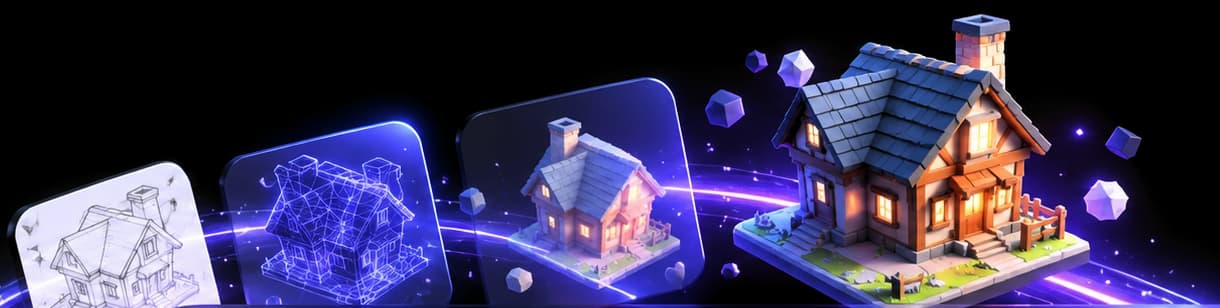
A 3D blockout is a rough version of a model, scene or level made from simple shapes to settle proportions, scale, silhouette and composition before any detail work. Concept artists paint over blockouts for accurate perspective, level designers test gameplay in them, and modellers use them as a base. They're meant to be fast and disposable.
What a blockout is for
A blockout answers the big questions before you spend time on small ones:
- Proportion: does the character's head-to-body ratio work?
- Scale: does a door fit a player? Does a building dominate the skyline?
- Silhouette: is the shape readable from a distance?
- Composition: do the shapes lead the eye where you want in a shot or level?
Because a blockout uses simple forms, you can change it in minutes. That's the point.
Who uses blockouts
Concept artists
A blockout gives a concept artist correct perspective, lighting and camera angles. They render the blockout, then paint detail on top. See 3D paintover. Environment and vehicle concept artists especially rely on this, because perspective errors are hard to fix by eye.
Level designers
Game levels are blocked out ("greyboxed") so designers can play them before art exists. Jump distances, cover and sightlines are all tested in the blockout.
Character and prop modellers
A blockout becomes the base mesh that's refined into the final model, or the reference the final is checked against.
Previs and film
Previs scenes are essentially animated blockouts. See what is previs.
A fast blockout workflow
- Start with primitives: cubes, cylinders and spheres for the big masses.
- Set real scale: put a human-height reference in the scene.
- Block big, then medium shapes. Stop before small details.
- Check from the final camera or the player's eye height.
- Light it simply: one key light shows form.
- Iterate quickly: duplicate and try variations instead of perfecting one.

Blocking out with AI drafts
AI 3D generation changes the first step. Instead of assembling primitives, you can generate a rough model of the idea and use it as a blockout, with more character than grey boxes and still fast. In Vi3W:
- From a sketch: sketch to 3D keeps the silhouette you drew.
- From a description: text to 3D for quick variations of an idea.
- From reference: image to 3D, comparing 25 image-to-3D models on the same picture.
- Simplify: Clean shape rebuilds the mesh at a low face count (from 500 faces) so it behaves like a light blockout.
- Pose characters: Add bones and Make it move pose a character blockout in an idle, walk or jump.
Download GLB, FBX, OBJ or glTF for free into Blender, Unreal, Unity or your paint-over setup. For a fuller path from concept to finished model, see concept art to 3D. For prototypes built on blockouts, see game prototype vs vertical slice.
Common mistakes
- Detailing too early. If you're adding bolts, it's no longer a blockout.
- No scale reference. Everything looks fine until a character stands next to it.
- Only one viewpoint. Check from the angles the final work will be seen from.
Open Vi3W and turn your next sketch into a blockout.
Frequently asked questions
what is 3d blockout
A rough version of a model, scene or level made from simple shapes to settle proportions, scale, silhouette and composition before any detail work.
3d blockout for concept art
Concept artists render a blockout for accurate perspective and lighting, then paint detail on top. It's especially useful for vehicles, architecture and environments.
3d blockout ai
AI 3D generators can turn a sketch or description into a rough model to use as a blockout, then you simplify it to a low face count and work over it.
Last reviewed