Comparison
Vi3W vs popular 3D tools and workflows
How Vi3W fits next to Blender, Unity, Unreal Engine, Godot and Three.js: what each tool is for, how you create in it, and how a Vi3W model gets there.
6 min read

Quick comparison
A side-by-side overview of roles, inputs, formats and pricing.
| Feature | Vi3W | Blender | Unity | Unreal Engine | Godot | Three.js |
|---|---|---|---|---|---|---|
| Best for | AI 3D generation and rapid iteration | Full creative control: modelling, sculpting, rendering | Real-time games and AR/VR apps | High-fidelity games and cinematics | Open-source game development | 3D experiences on the web |
| How you create | Text, image or sketch | Manual modelling and sculpting | Import 3D assets | Import 3D assets | Import 3D assets | Import assets or build in code |
| Formats | Exports GLB / glTF, FBX, OBJ | Imports and exports glTF, FBX, OBJ, USD | FBX natively; glTF via glTFast | glTF and FBX natively | glTF recommended; FBX (4.3+), OBJ | glTF via GLTFLoader; FBX, OBJ loaders |
| Editing | AI generation plus browser editor | Modelling, sculpting, texturing | Scene editing, materials, C# | Materials, lighting, Blueprints, C++ | Scene editing, GDScript, C# | Code-based (JavaScript) |
| Pricing | Free tier; paid plans (credits) | Free and open source (GPL) | Free Personal plan; paid tiers | Free; 5% royalty above $1M gross per product | Free and open source (MIT) | Free and open source (MIT) |
| Typical workflow | Prompt → Generate → Edit → Export | Model → Texture → Render → Export | Import → Set up → Build → Deploy | Import → Enhance → Render → Deploy | Import → Script → Build → Deploy | Import → Code → Deploy to web |
Facts about other tools come from their official documentation, linked in the sources below.
Detailed comparisons
How each tool works, when to use it, and how it connects to Vi3W.
Vi3W
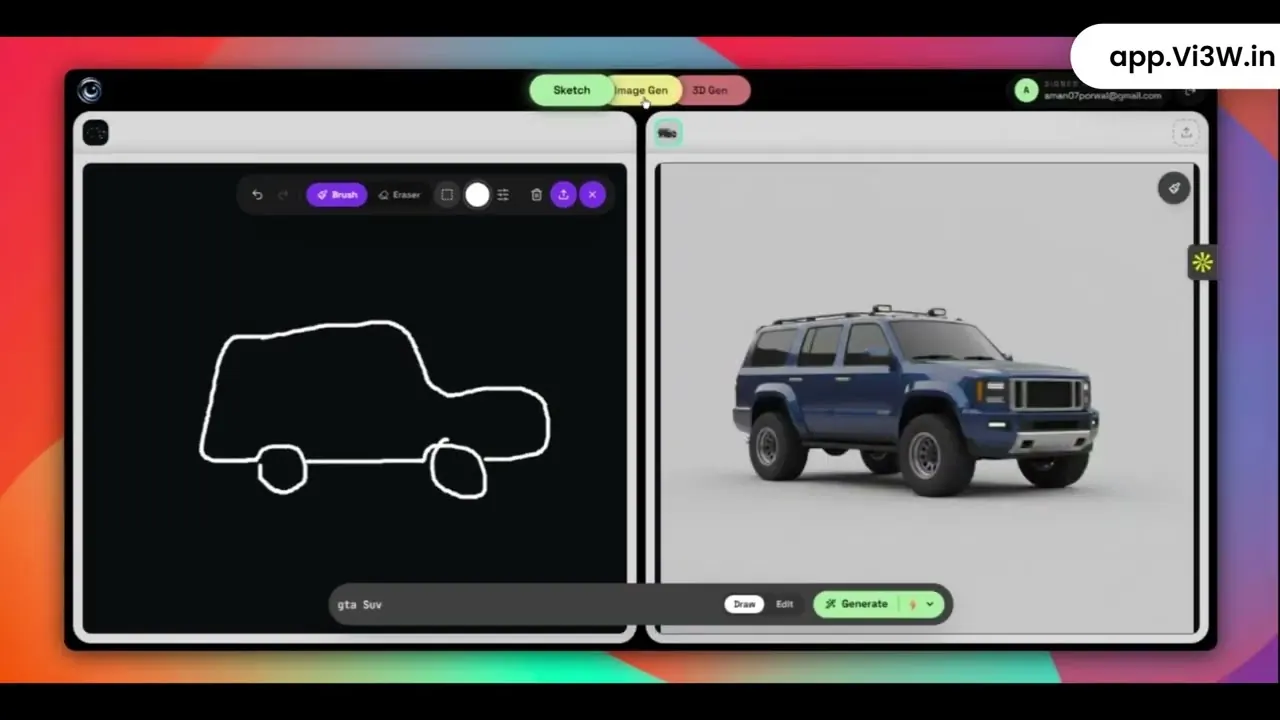
An AI 3D editor that turns text, images and sketches into textured, game-ready 3D models in the browser.
- Generate 3D models from text, an image or a sketch
- Automatic retopology and PBR textures on every model
- Export GLB / glTF, FBX or OBJ
- Works with Blender, Unity, Unreal Engine, Godot and Three.js
- Built for rapid prototyping and filling scenes with props
Blender
The free, open-source 3D suite. Where a generated model gets refined, rigged, retextured and rendered.
- Precise modelling, sculpting and UV editing
- Rigging and animation for characters
- Cycles and EEVEE rendering
- Imports Vi3W's GLB with materials already wired
Unity
A real-time engine for games, AR/VR and interactive apps, with C# scripting and a large asset ecosystem.
- Imports FBX natively, glTF through the glTFast package
- Strong for mobile, AR and VR targets
- LOD groups for generated props
- Asset Store and visual scripting
Unreal Engine
Epic's engine for high-fidelity real-time 3D: games, film and virtual production.
- Imports glTF and FBX natively
- Nanite handles dense meshes without manual LODs
- Blueprints visual scripting and C++
- Lumen lighting for cinematic scenes
Godot
A free, open-source engine for 2D and 3D games that treats glTF as its preferred 3D format.
- Drop a GLB into the project and it imports
- Generates LODs automatically on import
- GDScript and C# scripting
- MIT licence, no royalties
Three.js
The JavaScript 3D library behind most 3D on the web, loading GLB through GLTFLoader.
- Runs in every modern browser
- GLTFLoader for GLB with PBR materials
- Works with React, Vue or plain JavaScript
- Ideal for product viewers and web experiences
When to use each tool
Each tool has strengths for different jobs. Here are the common ones.
- Rapid prototypingUse Vi3W to explore ideas and generate base models quickly.
- Detailed modellingUse Blender for precise modelling, sculpting and complex geometry.
- Game developmentImport Vi3W models into Unity or Unreal for real-time games and apps.
- Web experiencesUse Three.js to build browser-based 3D experiences with Vi3W models.
- Open-source projectsUse Godot for lightweight games and fully open-source stacks.


Head-to-head comparisons
Vi3W against other AI 3D generators, on the same prompts.
None published yet. We only publish a head-to-head for a tool we have run ourselves, on the same prompts, with both outputs to show — including where the other tool is the better choice.
Frequently asked questions
Is Vi3W a replacement for Blender?
No. Vi3W generates the starting model: a textured, retopologised mesh from text, an image or a sketch. Blender is where you refine it, rig it, retexture it and render it. They work together through a GLB export.
What file format should I use?
GLB for the web, Godot, Three.js and Blender, because one file carries the mesh, UVs and PBR textures. FBX for Unity, which imports it natively. OBJ only when a tool requires it, since it drops the PBR material.
Which tool is best for game development?
Your engine — Unity, Unreal Engine or Godot — runs the game. Vi3W fills it: props, set dressing and first drafts of assets, exported in the format each engine prefers. Hero characters still deserve a modeller.
Can I edit Vi3W models after exporting?
Yes. Models are retopologised, UV-mapped and textured, so they open in Blender or any DCC tool and edit like a hand-built asset. Models are static: rigging and animation happen after export.
Related guides




Sources & further reading
From text to 3D
See where Vi3W fits in your pipeline.
Turn ideas into game-ready 3D models from text, a sketch or an image. No complex software — it all runs in your browser.