Guides
What is ByteDance Seed3D? Simulation-ready 3D assets from one image
ByteDance Seed3D turns one image into a simulation-ready 3D asset with PBR materials. How it works, what it's good for, and how to try it.
 Aman Porwal on LinkedIn (opens in a new tab)Founder @ Vi3W
3 min read

Quick answer
What is ByteDance Seed3D?
It is an image-to-3D foundation model from ByteDance's Seed research team that turns a single photo into a textured 3D asset with accurate geometry and physically based materials. ByteDance designed it so the output can go straight into physics simulators for robotics training. Vi3W runs it in the browser.
Where Seed3D comes from
Seed3D comes from ByteDance Seed, the company's research team. Its technical report, Seed3D 1.0: From Images to High-Fidelity Simulation-Ready 3D Assets, was submitted to arXiv on October 22, 2025.
The motivation is unusual for a 3D generator. The report starts from robotics: AI agents that learn to handle objects need training worlds that are both varied and physically accurate, and building those by hand is slow. Seed3D's job is to make physics-ready objects from photos, at scale.
How Seed3D builds a model
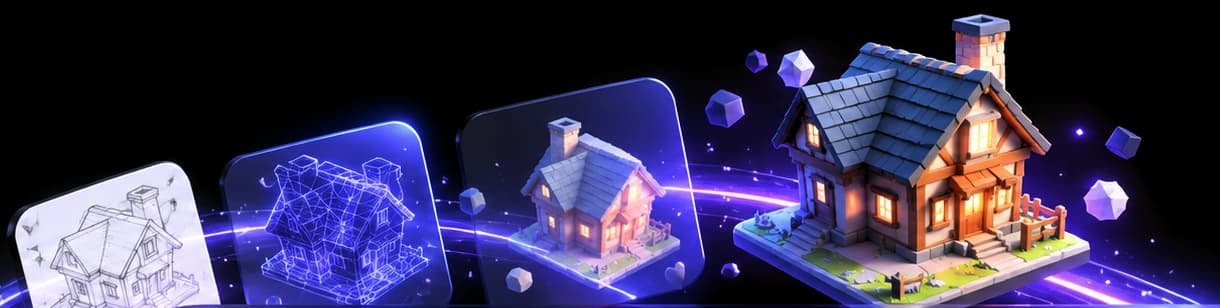
The report describes five stages:
- Geometry. A diffusion transformer generates the shape in a learned latent space, and a decoder turns it into a mesh.
- Multi-view synthesis. It imagines the object from other angles.
- PBR materials. It estimates physically based materials, not just colour. See PBR materials.
- UV texture completion. It fills in the texture where no view could see.
- Asset integration. It assembles the final textured mesh.
Because materials get their own stage, colour, roughness and metalness come out as separate maps rather than being baked into one picture. That is what lets a material react properly when you change the lighting.
What "simulation-ready" means for you
ByteDance's target is a physics engine, so it cares about clean, closed, correctly proportioned meshes with believable materials. The paper's examples are everyday objects: electronics, toys, storage containers and household items.
That overlaps neatly with practical uses outside robotics:
- Product visualisation for e-commerce, where materials need to look right under studio lights.
- Props for games and AR that sit on a table or shelf.
- Interior and set dressing with ordinary household objects.
The paper's examples are everyday objects, so for stylised characters or fantasy creatures, run a second model alongside it and compare.
Seed3D compared with the other models in Vi3W
- SAM 3D Objects reconstructs an object out of a busy real-world photo. Seed3D expects a clear image of the object.
- Hi3D v3.0 goes for extreme surface detail and face counts. Seed3D focuses on clean, physically believable assets.
- TRELLIS 2 is open source and handles thin open surfaces; Seed3D is a closed model built for solid objects.
We don't publish a ranking. Run the same image through two of them and keep the better result; the full list is a good place to pick the second.
Try Seed3D in Vi3W
Log in to app.vi3w.in, upload a clear photo of one object and choose ByteDance Seed 3D from the model list. Export the result as GLB, FBX or OBJ, with optional automatic retopology.
Frequently asked questions
seed3d 1.0 3d asset generation
Seed3D 1.0 generates one 3D asset from one image in five stages: geometry, multi-view images, PBR materials, UV texture completion and final assembly. The result is a textured mesh rather than a point cloud or splat.
seed3d github
ByteDance published the Seed3D 1.0 technical report on arXiv (2510.19944), and the model is offered through ByteDance's Volcano Engine platform. To use it without an account there, pick ByteDance Seed 3D in Vi3W.
bytedance image to 3d
ByteDance's image-to-3D model is Seed3D. Upload a clear image of one object and it builds a textured, PBR-ready mesh you can export as GLB, FBX or OBJ from Vi3W.
Last reviewed