Guides
Product rendering: how photoreal product images are made, and which software to use
How product rendering works, the main software (KeyShot, Blender, Cinema 4D, Unreal), the workflow from model to final image, and where AI drafts help.
 Aman Porwal on LinkedIn (opens in a new tab)Founder @ Vi3W
3 min read

Quick answer
What is product rendering?
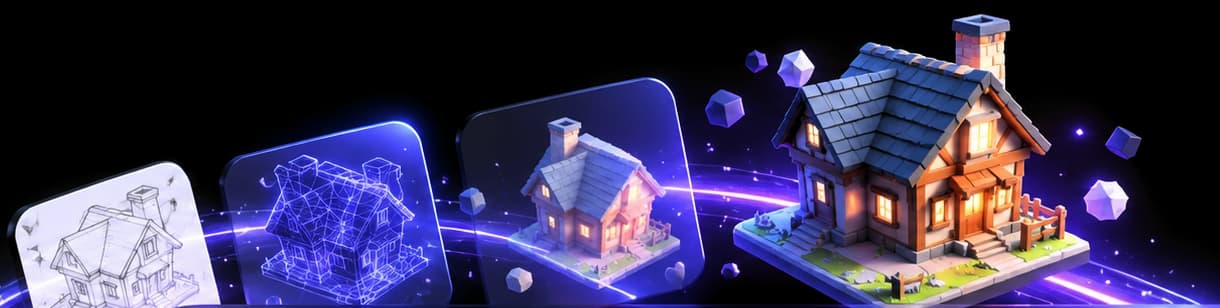
Product rendering is making photoreal images or videos of a product from a 3D model instead of a photo shoot. A model, built from CAD, reference photos or a generated draft, gets realistic materials, studio lighting and a camera, and a renderer such as KeyShot, Blender Cycles, Redshift or Unreal Engine produces the final image.
At a glance
| Software | Known for | Good fit |
|---|---|---|
| KeyShot | Fast, material-led product rendering; imports FBX, GLB/glTF, OBJ and CAD | Industrial designers, product marketing |
| Blender (Cycles) | Free, full 3D suite, path-traced renderer | Freelancers, small studios, animation |
| Cinema 4D + Redshift/Octane | Motion-design standard | Ad agencies, launch films |
| Unreal Engine | Real-time plus Path Tracer, configurators | Interactive and high-volume output |
Why brands render instead of shoot
A rendered product image can be made before the product exists, in every colourway, from any angle, and changed without a reshoot. For e-commerce, ads and launches, one good model produces hundreds of images. Our 3D rendering vs product photography guide compares the two approaches in detail.
The workflow
- Model. From engineering CAD (most accurate), from reference photos and measurements, or from a generated draft.
- Materials. Physically based materials: metal, plastic, glass, fabric, leather, each matched to the real product.
- Lighting. Studio setups (soft key, rim, fill) or an HDRI environment.
- Camera. Real focal lengths, usually long lenses for products, plus depth of field.
- Render. A path tracer for photoreal output.
- Post. Colour correction, background clean-up, compositing.
Choosing software
The table above covers the main options. In short:
- KeyShot if speed and materials matter more than animation depth. Its manual lists FBX, GLB/glTF and OBJ among its import formats.
- Blender if you want a free all-rounder.
- Cinema 4D if you work in motion design. See importing models into Cinema 4D.
- Unreal Engine for real-time, interactive or high-volume work. See product rendering in Unreal Engine.
For a direct comparison of two of these, see KeyShot vs Blender.
AI in product rendering
AI shows up in two very different places:
- AI image generators make product-style images from prompts or photos. They're fast, but they don't give you a reusable 3D model, and keeping the product exactly consistent across images is hard.
- AI 3D generators make the 3D model itself, which you then render properly. You get consistency across every angle, because it's the same model each time.
Vi3W is the second kind. It turns a product photo, a sketch or a text description into a textured 3D model, and you can run the same photo through several of the 25 image-to-3D models to compare accuracy. Download GLB, FBX or OBJ for free and render in KeyShot, Blender, Cinema 4D or Unreal. New paint job tries finishes on the same shape, which helps with early colourway decisions.
Generated models are strongest for concepts, previs, stylised campaigns and background products. For hero renders of a real product, plan on an artist refining or rebuilding the model for exact edges and details.

Quality checklist for product renders
- Edges are bevelled and catch highlights.
- Materials match real samples under the same light.
- No floating parts or intersecting geometry.
- Reflections show a controlled environment, not a random HDRI.
- Scale and proportions match the real product.
- The same model renders consistently across every angle and colourway.
Open Vi3W to turn a product photo into a model you can render.
Frequently asked questions
what is product rendering
Making photoreal images or videos of a product from a 3D model instead of a photo shoot, using realistic materials, studio lighting, a virtual camera and a renderer.
product rendering software
KeyShot, Blender with Cycles, Cinema 4D with Redshift or Octane, and Unreal Engine are the common choices. Pick by speed, animation needs and whether you need real-time output.
product rendering with ai
AI image generators make product-style pictures but no reusable model. AI 3D generators make the model itself, which you render consistently from every angle.
Last reviewed